b2bvic / Owned Record
Your AI forgets you every session. Fix that once.
You keep explaining your business to Claude at the start of each session.
Keep your business context in Markdown files you own. Have Claude read the relevant files before it drafts.
One payment. Digital download. No refunds except where required by law.
Checkout is not open yet.
Stop rebuilding the brief.
You already did the work of explaining it. Then you open another session and do it again.
The scope changed. The old brief stayed.
You need the next proposal to use the decision you made yesterday. That decision is still buried in a chat.
You correct the same assumption again.
You explain how you work, which words you avoid, and what needs your approval. The correction needs a place you can find.
Your best example is somewhere else.
You have a past output worth reusing. You spend the start of the session looking for it instead of using it.
Give the next session a source to read.
Owned Record gives your context a home outside the chat. Save the current decision, keep examples beside it, and read the relevant files before drafting.
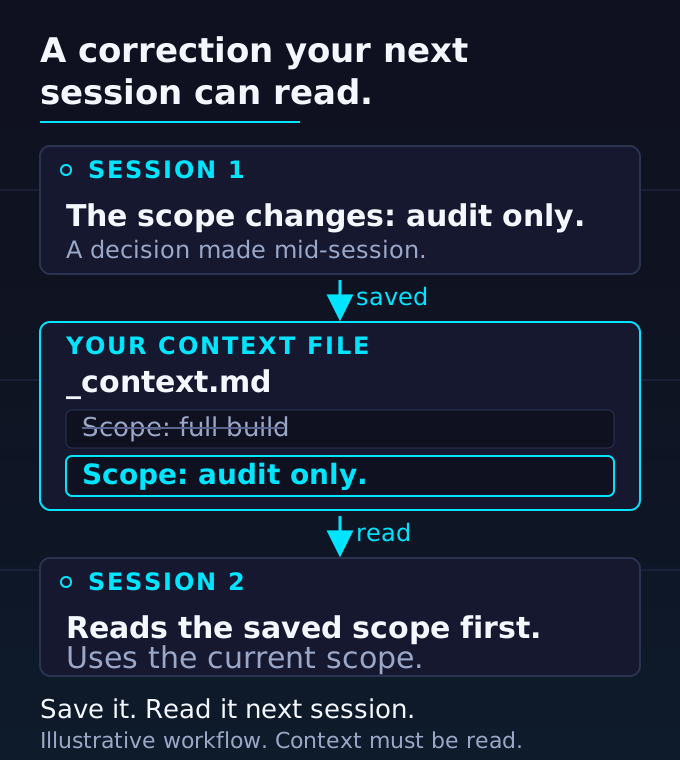
You can inspect what carries forward.
Open the file to see the current scope. Edit it when the decision changes. Back it up with the rest of your work.
The next brief has a named source. You can check it instead of guessing what the chat retained.
Built from 13 years of client work and five years of one vault, with the public architecture at github.com/b2bvic/owned-record.
The public reference shows current-state files, activity history, routing hints, and reusable procedures. Inspect it before you buy.
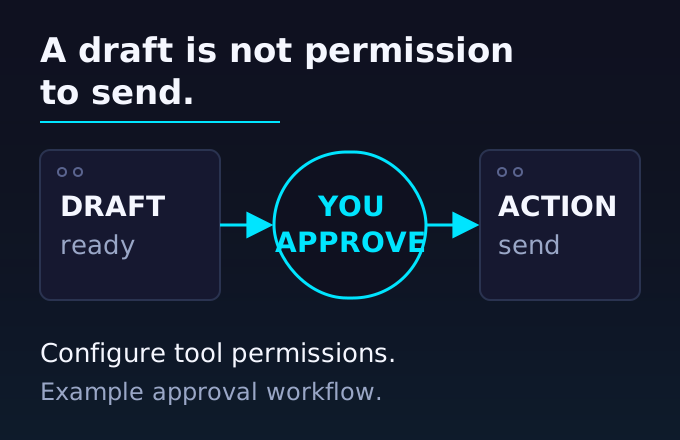
A draft still needs a decision.
One rule separates preparing work from taking action. Ask before sending, posting, or deleting, and configure tool permissions to match.
What your $27 puts in place
You get the starting files and the walkthroughs to configure them. Your Claude subscription or API usage is separate.
A starter vault you can make your own
Empty domains and filled templates, based on the public Owned Record structure. Add your working context without starting from a blank folder.
Three install recordings
Each is under eight minutes. Connect Claude, add one context file and ten past outputs, then set your approval rule.
Eight skills for recurring work
Daily start, capture, route, decide, weekly review, correction, export, and handoff. The skill files ship in
.claude/skills/.A one-page reference PDF
What the vault does, what Claude reads first, and what requires your approval. Keep it beside the install while you set up.
Updates through the same private link
Your purchase includes lifetime updates. Keep the link with your install files.
Start with one part of your work.
Open the vault. Use Obsidian to work with the files. Connect Claude to the files you choose.
Add your context. Save one context file and ten past outputs. Choose a project where past decisions matter.
Set the approval rule. Define what needs your review. Check tool permissions before connecting external actions.
You do not need to document your whole business before you start. Add context as the work needs it.
Your context. Your files. One payment.
The public reference is available if you want to configure it yourself. The $27 package adds the prepared starting point, walkthroughs, eight skills, and PDF.
One payment. Digital download. No refunds except where required by law.
Checkout is not open yet.
Built for work that has a history.
You consult, run a business, or manage operations. Your next decision depends on client history, past work, and corrections you need to carry forward.
This is not for you if you want an agent to run your life without checking in.
Before you make it yours
What is a vault?
A folder of Markdown files. You can open, edit, copy, and back up those files. Obsidian gives you a place to work with them.
Why pay when the architecture is public?
Use the public reference if you want to configure it yourself. Buy the install package for the prepared starting point and walkthroughs.
Does this replace Claude's memory features?
You keep a separate source you can inspect and edit. The offer centers on those files and your workflow. It does not require a promise about what a chat remembers.
Does Claude read everything automatically?
No. You configure file access and choose the relevant context. The public reference provides routing hints; automatic local recall is optional.
Does the approval rule prevent every unwanted action?
A written rule sets the instruction. Tool permissions control what Claude can execute. Review those permissions before connecting tools that send, publish, or delete.
Do the files stay private?
You control the files and the access you grant. Local storage does not make Claude an offline model. Review what you share through your Claude connection.
What does the $27 cover?
The install package and lifetime updates through its private link. It does not include a Claude subscription or API credits.
Can I get a refund?
All sales are final. No refunds except where required by law. Review the contents and setup requirements before purchase.
What if my download does not work?
Email hello@b2bvic.com from your purchase email address for delivery support.
Give your next session something to build on.
Keep the context you already worked to explain. Read it, update it, and use it again.
One payment. Digital download. No refunds except where required by law.
Checkout is not open yet.